
🔀 Control Flow
New to advanced configuration?
Read these pages in order for the clearest mental model:
- Control Flow (this page) — how components compose
- Custom Sensors — build virtual sensors
- Mix Profiles — combine multiple graph profiles
- Overlay Profiles — layer per-group offsets
- Modes — save and switch entire cooling configurations
You can combine Profiles, Functions, and Custom Sensors to build powerful control flows. The example below shows how a single Mix Profile can drive multiple fan groups with their own adjustments.

Figure: A Mix Profile (CPU + GPU) drives the case, then each group applies its own adjustments
- Mix Profile (CPU + GPU) provides one driver for the overall case airflow.
- Front intake and rear exhaust apply Overlay Profile tweaks per group.
- Functions (hysteresis/thresholds) stabilize behavior and reduce oscillation.
Viewing a Channel's Control Flow
To inspect the full control flow for a specific fan channel, open the Controls view and select the fan channel you want to inspect. A control flow chart is displayed showing every component that contributes to that channel's output — profiles, custom sensors, and temperature sources — all the way from raw inputs down to the final duty signal sent to the fan.
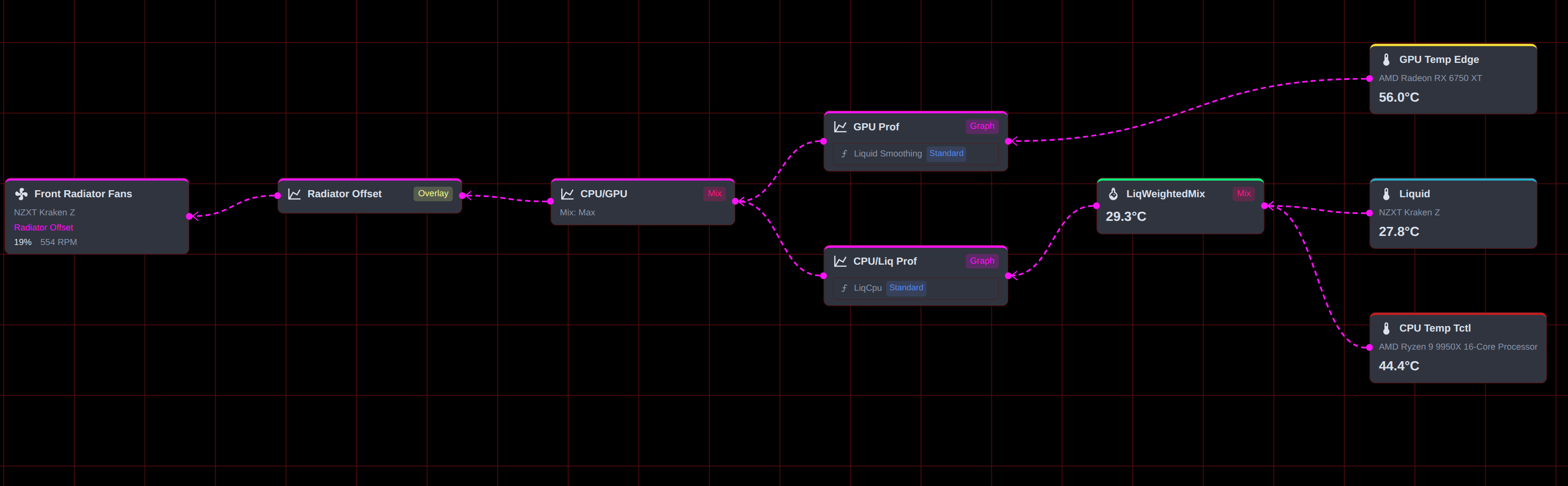
This chart is useful for:
- Tracing exactly which temperature sources feed into a Mix Profile.
- Confirming that custom sensors are wired up correctly before relying on them.
- Debugging unexpected fan behavior by following the signal path step by step.
See Also
- Custom Sensors - Build virtual sensors that mix or transform inputs
- Mix Profiles - Combine multiple graph profiles into one driver
- Overlay Profiles - Layer per-group offsets on a base profile
- Functions - Add hysteresis and step limits to any profile
- Controls - Inspect and apply the full control chain to fan channels